 Skylar Grant
f620cd96d4
Skylar Grant
f620cd96d4
README covers the Server-based Zoho client, the new .env settings,
deployment (image, compose, Nginx Proxy Manager), signing in and the
security model. NOTES records the Zoho OAuth gotchas and the decisions
behind the rebuild. ROADMAP describes the current architecture and the
planned per-browser settings panel. CLAUDE.md and SESSION.md are
brought up to date.

Co-Authored-By: Claude Opus 5.5 <noreply@anthropic.com>
10 KiB
sdp-request-watcher
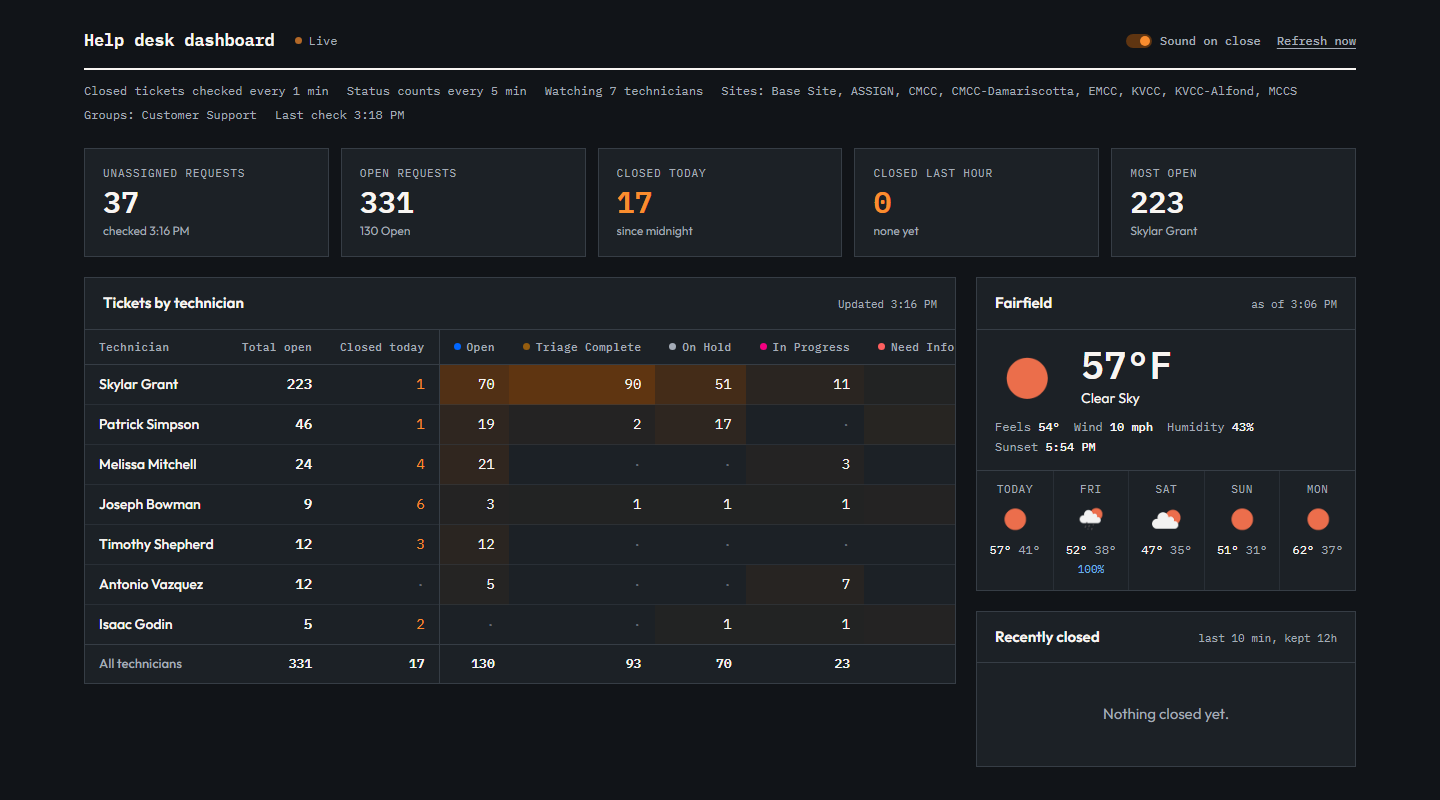
A help desk dashboard for ManageEngine ServiceDesk Plus (SDP) Cloud. It shows each technician's open tickets by status, plays a sound when a ticket is closed, tracks the unassigned queue, and shows local weather.
Everyone signs in with their own Zoho account, and every query runs as that person. It's built as a Docker image (v0idf1sh/sdp-dashboard) to run behind Nginx Proxy Manager, which limits access to MCCS network addresses.
Setup
1. Zoho API client
Create a Server-based Application at https://api-console.zoho.com/add:
- Homepage URL: the dashboard's address, e.g.
https://dashboard.example.com. - Authorized Redirect URI: that address plus
/auth/callback, e.g.https://dashboard.example.com/auth/callback. It must matchPUBLIC_URLexactly. To also run it locally, addhttp://localhost:3000/auth/callback, or use a second client for local work.
That gives you the client ID and secret. The app asks each user for two scopes: SDPOnDemand.requests.READ, so it can read requests but never change them, and AaaServer.profile.READ, only to show who is signed in.
The old Non-Browser Application client (device-code sign-in) is no longer used.
2. .env file
Copy src/env.example to a file named .env and fill it in. dotenv reads .env from the folder you start the server in, so keep .env in the project root and start the server from there (see step 3).
| Setting | Required | What it does |
|---|---|---|
CLIENT_ID, CLIENT_SECRET |
Yes | The Zoho Server-based Application credentials. |
SESSION_SECRET |
Yes | At least 32 characters. Encrypts the sign-in cookie. Generate one with openssl rand -hex 32. Changing it signs everyone out. |
PUBLIC_URL |
Yes when hosted | The address people open, with no trailing slash, e.g. https://dashboard.example.com. Zoho sends people back to PUBLIC_URL/auth/callback. Defaults to http://localhost:3000. Cookies are marked secure when it starts with https://. |
SESSION_DAYS |
No | How many days a sign-in lasts before Zoho is asked again. Defaults to 7. |
TECHNICIAN_NAMES |
No | Comma-separated technician names, spelled as they appear in SDP. One table row per name. Leave it empty to include every technician. |
STATUS_NAMES |
No | Statuses that count as "closed" for the ding and the Closed today count. Everything else counts as open. Defaults to Closed,Resolved,Canceled. |
SITE_NAMES |
No | Only include requests from these sites (the region). Leave it empty for all sites. |
GROUP_NAMES |
No | Only include requests in these support groups, e.g. Customer Support. Leave it empty for all groups. |
UNASSIGNED_EXCLUDED_STATUSES |
No | Statuses the Unassigned requests counter leaves out. Defaults to STATUS_NAMES. |
WORKLOAD_MINUTES |
No | How often the status table and unassigned count refresh, in minutes. Defaults to 5. |
OWM_API_KEY, OWM_ZIP_CODE |
No | OpenWeatherMap key and zip code for the weather card. Leave either one empty to hide the card. A free key from https://openweathermap.org/api is enough. New keys can take a couple of hours to start working. |
PORT |
No | Port the server listens on. Defaults to 3000. Leave it alone in Docker. |
TRUST_PROXY |
No | Which proxies to believe for the client's IP address in the logs. Defaults to private and loopback addresses, which covers NPM on the same Docker host. |
Spaces around commas are fine in every list.
The central region settings currently in use:
SITE_NAMES=Base Site,ASSIGN,CMCC,CMCC-Damariscotta,EMCC,KVCC,KVCC-Alfond,MCCS
GROUP_NAMES=Customer Support
UNASSIGNED_EXCLUDED_STATUSES=Canceled,Closed,Need Information,On Hold,Resolved
These match the "Central Region Unassigned" custom view in ManageEngine. The Unassigned requests count was checked against that view and matched.
3. Run it locally
npm install
npm run app
npm run app runs node src/server.js from the project root. Then open http://localhost:3000. Leave PUBLIC_URL unset (or set it to http://localhost:3000) and register http://localhost:3000/auth/callback with the Zoho client.
Deployment
Image
Pushing a tag that matches v*-prod* (for example v1.1.0-prod1) runs .gitea/workflows/docker.yml on the self-hosted Gitea runner. It builds the image and pushes it to Docker Hub as v0idf1sh/sdp-dashboard:<tag> and :latest. The runner needs Docker, and the repository needs DHUB_UNAME and DHUB_PASS secrets (a Docker Hub access token works for the password). Pulling the new image and restarting the container is done by hand.
git tag v1.1.0-prod1
git push origin v1.1.0-prod1
Server
On the VPS, put docker-compose.yml and a filled-in .env in the same folder, then:
docker compose pull
docker compose up -d
The container keeps no state, so it needs no volume, and restarting or upgrading it doesn't sign anyone out.
The compose file publishes no ports. Docker's port publishing bypasses the host firewall, so 3000:3000 would let anyone reach the app directly and skip NPM's access list. Instead the container joins NPM's Docker network (npm_default by default; set NPM_NETWORK if yours is named differently, and check with docker network ls).
Nginx Proxy Manager
- Proxy host: the dashboard's subdomain, forwarding to
http://sdp-dashboard:3000. - SSL: request a certificate and turn on Force SSL. Sign-in cookies are secure-only when
PUBLIC_URLishttps://. - Access list: allow MCCS' public IP blocks and deny everything else. Attach it to the proxy host.
Signing in
Opening the dashboard shows a Sign in with Zoho button. It goes to Zoho's consent page, and Zoho sends you back signed in. Use the Zoho account you use for ServiceDesk Plus. The dashboard shows what that account can see, limited to the region in .env.
The sign-in is kept in an encrypted cookie in that browser for SESSION_DAYS (7 by default), and the hourly Zoho access token is renewed automatically. Sign out clears the cookie and revokes the token at Zoho. If Zoho or SDP stops accepting the sign-in, the page goes back to the sign-in button.
Security
- Network: NPM only lets in MCCS' public IP addresses (campuses and VPN). From anywhere else the subdomain doesn't answer.
- Per-user sign-in: every request needs the user's own Zoho sign-in. There is no shared token, so a reachable page with no sign-in shows nothing.
- Tokens: the Zoho tokens live only in the user's cookie, encrypted and authenticated with
SESSION_SECRET(AES-256-GCM). The cookie isHttpOnly, so page scripts can't read it, andSameSite=Lax. The server doesn't store tokens or sessions. - Read-only: the only SDP scope is
SDPOnDemand.requests.READ.
The dashboard
- Stat tiles: unassigned requests, total open requests, closed today, closed in the last hour, and the technician with the most open tickets.
- Tickets by technician: each technician's open tickets by status. Total open and Closed today come first, so they stay visible on narrow screens while the status columns scroll sideways. Darker cells mean more tickets. A row flashes when that technician closes a ticket.
- Weather: current conditions and a 5-day forecast for
OWM_ZIP_CODE, refreshed every 10 minutes. - Recently closed: the live closed-ticket feed, checked every minute. A ding plays for each new close. The sound is on by default, and the Sound on close toggle mutes it in that browser.
- Refresh now reruns every check immediately.
The browser runs the checks, using the signed-in user's token, so every open dashboard makes its own SDP calls. That's one small query a minute and a recount every WORKLOAD_MINUTES. On first load it fetches the last 12 hours of closes to fill the feed.
If a query fails, a red error box shows what SDP returned, and the other sections keep working. If the table ever shows partial, a query matched more tickets than it can page through (2,000). The server log (docker compose logs) then has the details, including SDP's total count. A very large total usually means SDP ignored the search criteria.
Unassigned verification list
src/public/index.html still has a hidden table listing every unassigned request by ID and subject. It was used to confirm the count matches the ManageEngine view. To show it again, set SHOW_UNASSIGNED_LIST = true.
How it works
| File | Role |
|---|---|
src/server.js |
Reads .env, then starts Express. |
src/auth.js |
Zoho web sign-in: the authorization URL, code exchange, token renewal and revoke. |
src/session.js |
The encrypted session cookie, and renewing the access token when it's due. |
src/routes.js |
/auth/login, /auth/callback and /auth/logout, plus /api/session, /api/closed, /api/workload and /api/weather, which need a sign-in. |
src/tickets.js |
SDP API queries for the closed feed, the status table, closed today and unassigned requests. |
src/weather.js |
OpenWeatherMap current weather and forecast, cached for 10 minutes. |
src/public/index.html |
The dashboard page. It runs the checks and keeps the closed feed. |
Dockerfile, docker-compose.yml |
The image, and an example of how to run it. |
.gitea/workflows/docker.yml |
Builds and pushes the image on v*-prod* tags. |
Every SDP query is limited to the configured sites, groups and technicians. Results are also re-checked locally, so a ticket from outside the region is never counted even if the API returns one.
Requirements
Node.js 18 or newer to run it directly; the image uses Node 24. Dependencies are axios, dotenv and express, all installed by npm install.
Credits
- Skylar Grant: project owner and author.
- Isaac Godin: original page design.
- Claude (Anthropic, via Claude Code): dashboard, region scoping, unassigned counter, weather card, SDP query fixes, per-user sign-in and Docker packaging, built with Skylar.
Reference materials (provided by Skylar)
License
MIT. See LICENSE.