 Skylar Grant
c2cf725819
Skylar Grant
c2cf725819
- Dockerfile: node:24-alpine, production deps only, runs as the node user, healthcheck on /healthz. No volume, because the server keeps no state. - docker-compose.yml: example for the VPS. It publishes no ports, since Docker's port publishing bypasses ufw and would skip NPM's IP access list. It joins NPM's network instead. - .gitea/workflows/docker.yml: on v*-prod* tags, builds on the self-hosted runner and pushes v0idf1sh/sdp-dashboard:<tag> and :latest using the DHUB_UNAME and DHUB_PASS secrets. Co-Authored-By: Claude Opus 5.5 <noreply@anthropic.com> |
||
|---|---|---|
| .gitea/workflows | ||
| .vscode | ||
| docs | ||
| images | ||
| src | ||
| .dockerignore | ||
| .gitignore | ||
| CLAUDE.md | ||
| docker-compose.yml | ||
| Dockerfile | ||
| LICENSE | ||
| package-lock.json | ||
| package.json | ||
| README.md | ||
| SESSION.md | ||
sdp-request-watcher
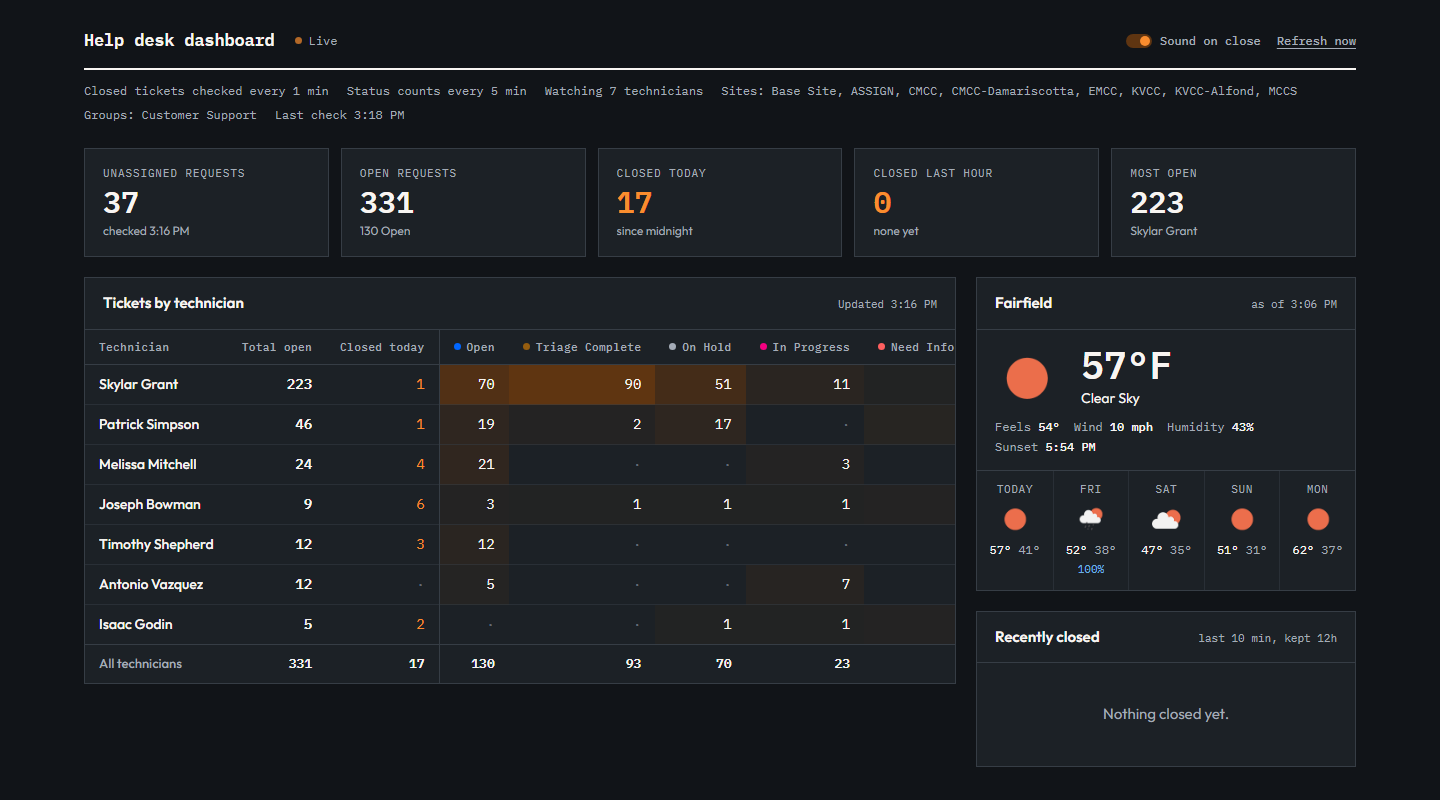
A local Node.js dashboard for ManageEngine ServiceDesk Plus (SDP) Cloud. It shows each technician's open tickets by status, plays a sound when a ticket is closed, tracks the unassigned queue, and shows local weather.
Setup
1. Zoho API client
Create a Non-Browser Application at https://api-console.zoho.com/add. That gives you the client ID and secret. The app only asks for the SDPOnDemand.requests.READ scope, so it can read requests but never change them.
2. .env file
Copy src/env.example to a file named .env and fill it in. dotenv reads .env from the folder you start the server in, so keep .env in the project root and start the server from there (see step 3).
| Setting | Required | What it does |
|---|---|---|
CLIENT_ID, CLIENT_SECRET |
Yes | The Zoho Non-Browser Application credentials. |
TECHNICIAN_NAMES |
No | Comma-separated technician names, spelled as they appear in SDP. One table row per name. Leave it empty to include every technician. |
STATUS_NAMES |
No | Statuses that count as "closed" for the ding and the Closed today count. Everything else counts as open. Defaults to Closed,Resolved,Canceled. |
SITE_NAMES |
No | Only include requests from these sites (the region). Leave it empty for all sites. |
GROUP_NAMES |
No | Only include requests in these support groups, e.g. Customer Support. Leave it empty for all groups. |
UNASSIGNED_EXCLUDED_STATUSES |
No | Statuses the Unassigned requests counter leaves out. Defaults to STATUS_NAMES. |
WORKLOAD_MINUTES |
No | How often the status table and unassigned count refresh, in minutes. Defaults to 5. |
ADMIN_KEY |
No | Key needed for Connect and Refresh now. Enter it with the page's Admin button; it's remembered in that browser. Without a key, only browsers on the server's own machine can use those buttons. Set one before hosting. |
TOKEN_FILE |
No | Where the Zoho sign-in is saved. Defaults to data/token.json, which git ignores. |
OWM_API_KEY, OWM_ZIP_CODE |
No | OpenWeatherMap key and zip code for the weather card. Leave either one empty to hide the card. A free key from https://openweathermap.org/api is enough. New keys can take a couple of hours to start working. |
Spaces around commas are fine in every list.
The central region settings currently in use:
SITE_NAMES=Base Site,ASSIGN,CMCC,CMCC-Damariscotta,EMCC,KVCC,KVCC-Alfond,MCCS
GROUP_NAMES=Customer Support
UNASSIGNED_EXCLUDED_STATUSES=Canceled,Closed,Need Information,On Hold,Resolved
These match the "Central Region Unassigned" custom view in ManageEngine. The Unassigned requests count was checked against that view and matched.
3. Run it
npm install
npm run app
npm run app runs node src/server.js from the project root. Then open http://localhost:3000. Set PORT in .env to use a different port.
Connecting to Zoho
An admin connects once. The sign-in is saved to data/token.json and renewed automatically every hour, so the board keeps running and picks up again after a restart. You only connect again if Zoho revokes the sign-in; the page then shows the Connect button again. Treat data/token.json like a password.
-
Click Connect. If
ADMIN_KEYis set, click Admin and enter it first.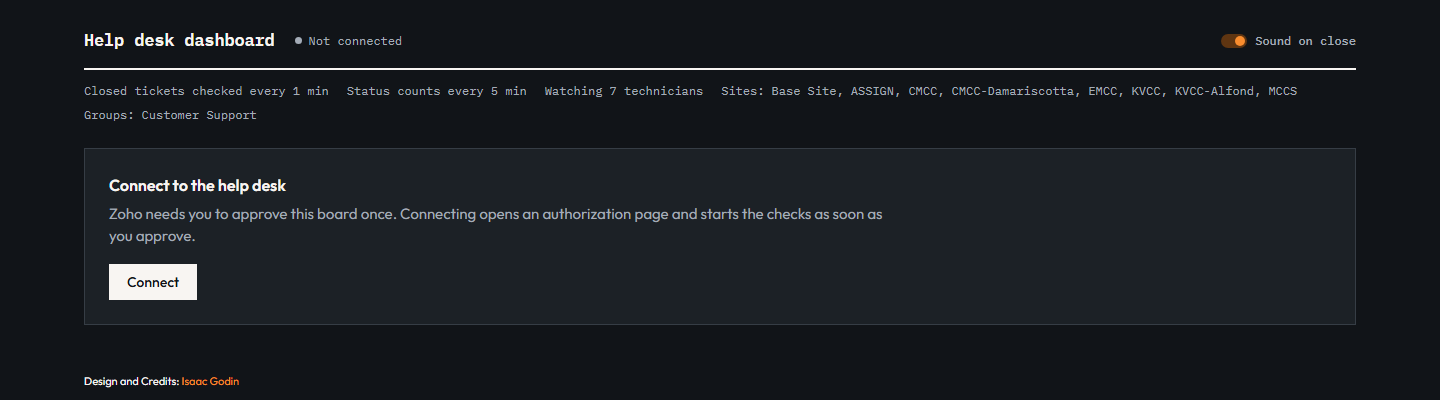
-
Once Zoho sends back a device code, the code and an Open authorization page button appear. The Zoho page opens in a new tab.
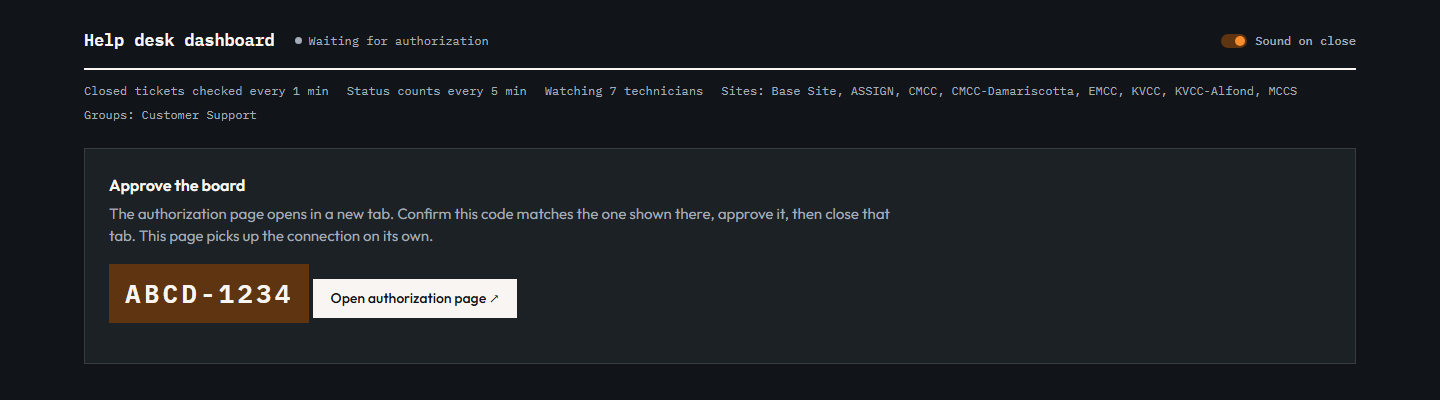
-
Check that the code matches, tick the box and click Accept, then close that tab.
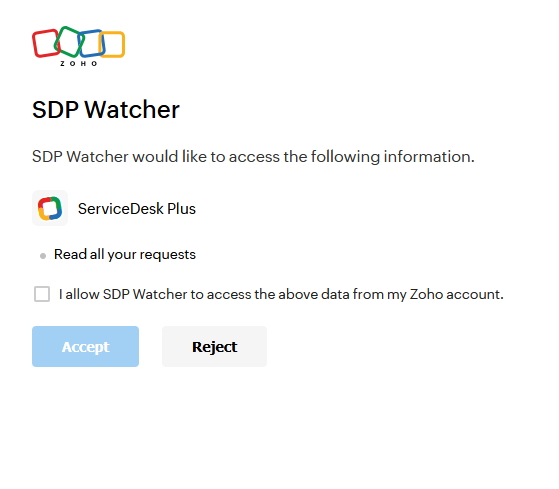
-
Return to the dashboard tab. Zoho can't redirect back to a local app, but the dashboard checks the server every few seconds and goes live by itself once you approve.
The dashboard
- Stat tiles: unassigned requests, total open requests, closed today, closed in the last hour, and the technician with the most open tickets.
- Tickets by technician: each technician's open tickets by status. Total open and Closed today come first, so they stay visible on narrow screens while the status columns scroll sideways. Darker cells mean more tickets. A row flashes when that technician closes a ticket.
- Weather: current conditions and a 5-day forecast for
OWM_ZIP_CODE, refreshed every 10 minutes. - Recently closed: the live closed-ticket feed, checked every minute. A ding plays for each new close. The sound is on by default, and the Sound on close toggle mutes it in that browser.
- Refresh now reruns every check immediately.
If a query fails, a red error box shows what SDP returned, and the other sections keep working. If the table ever shows partial, a query matched more tickets than it can page through (2,000). The server console then logs the details, including SDP's total count. A very large total usually means SDP ignored the search criteria.
Unassigned verification list
src/public/index.html still has a hidden table listing every unassigned request by ID and subject. It was used to confirm the count matches the ManageEngine view. To show it again, set SHOW_UNASSIGNED_LIST = true.
How it works
| File | Role |
|---|---|
src/server.js |
Reads .env, then starts Express and the services. |
src/auth.js |
Zoho device-code sign-in. |
src/boardService.js |
Holds the token and state, renews the token, and runs the refresh timers. |
src/tokenStore.js |
Saves the Zoho sign-in to disk so it survives restarts. |
src/tickets.js |
SDP API queries for the closed feed, the status table, closed today and unassigned requests. |
src/weather.js |
OpenWeatherMap current weather and forecast, cached for 10 minutes. |
src/routes.js |
/api/state, /api/connect, /api/check and /api/weather. |
src/public/index.html |
The dashboard page. |
Every SDP query is limited to the configured sites, groups and technicians. Results are also re-checked locally, so a ticket from outside the region is never counted even if the API returns one.
Requirements
Node.js 18 or newer. Dependencies are axios, dotenv and express, all installed by npm install.
Credits
- Skylar Grant: project owner and author.
- Isaac Godin: original page design.
- Claude (Anthropic, via Claude Code): dashboard, region scoping, unassigned counter, weather card and SDP query fixes, built with Skylar.
Reference materials (provided by Skylar)
- Non-Browser Apps - Overview
- Non-Browser Apps - Initiation Request
- Non-Browser Apps - Polling Request
- Get List Request
- Input Data
- Search Criteria
- OpenWeatherMap Current Weather and 5 Day Forecast
License
MIT. See LICENSE.